4 min readTaxClar
Interactive Brokers and the Swiss tax return: an eSteuerauszug from your Activity Statement
Interactive Brokers does not issue a Swiss eSteuerauszug. Which statement to download from the Client Portal, what the securities list in the tax return needs, and how the Activity Statement becomes a tax statement with a barcode.
Interactive Brokers does not issue a Swiss eSteuerauszug (electronic tax statement). If you live in Switzerland and hold an account there, you get an Activity Statement in January and have to fill in the securities list of your tax return from it yourself. This article shows which document you need, what the tax office wants to see, and how to avoid typing it all in.
What belongs in the tax return
The securities and assets list (Wertschriften- und Guthabenverzeichnis) asks the same of an IBKR account as of an account at a Swiss bank:
- every security with its valor number or ISIN, quantity and tax value on 31 December,
- purchases and sales during the year with date and quantity,
- every dividend and interest payment with date and gross amount,
- tax withheld abroad, for example on US dividends, as the basis for form DA-1,
- cash balances in francs and in foreign currencies on 31 December.
At a Swiss bank all of this is on the eSteuerauszug, and the tax software reads it from the barcode. At Interactive Brokers it is spread over a statement that often runs to fifty pages or more.
The right statement: Activity Statement, "Default" template
The Client Portal offers several templates. For the tax return you need the annual Activity Statement in the "Default" template:
- Open the Client Portal, go to "Performance & Reports", then "Statements".
- Choose Activity, period "Annual", template "Default", format PDF.
- Download the statement for the tax year. It is normally available by the end of January and free.
It contains the positions on 31 December, trades, dividends, withholding tax, interest and fees. At the end comes the section Financial Instrument Information, with the Security ID (ISIN) for each instrument.
That section is the one that matters. The shorter MTM Summary template does not have it. With only that one you have positions without an ISIN, and without an ISIN or valor number a security cannot be identified in the tax return.
Option 1: enter it by hand
You can enter every position in your canton's tax software: ISIN, quantity, purchase and sale dates. For listed securities the software usually takes the tax value and the income from the price list of the Federal Tax Administration. Whatever is missing there you enter yourself, along with the foreign-currency accounts and the withholding tax for the DA-1.
That works for three ETFs held all year. With thirty securities, quarterly dividends and a few trades it takes an evening, and every typo in a quantity or a date shifts the income.
Option 2: turn the PDF into an eSteuerauszug
TaxClar reads the Activity Statement and produces an eSteuerauszug under eCH-0196: a PDF with a barcode plus the XML, the same thing a Swiss bank delivers. Your canton's tax software reads the barcode and fills in the securities list.
How it goes:
- You upload the Activity Statement as a PDF. No Flex Query, no API key, no Interactive Brokers login.
- You see the positions, income and accounts that were read, as a table in the structure of the eSteuerauszug, and check them. Corrections are typed in plain language.
- You confirm. Only then is the PDF with the barcode generated.
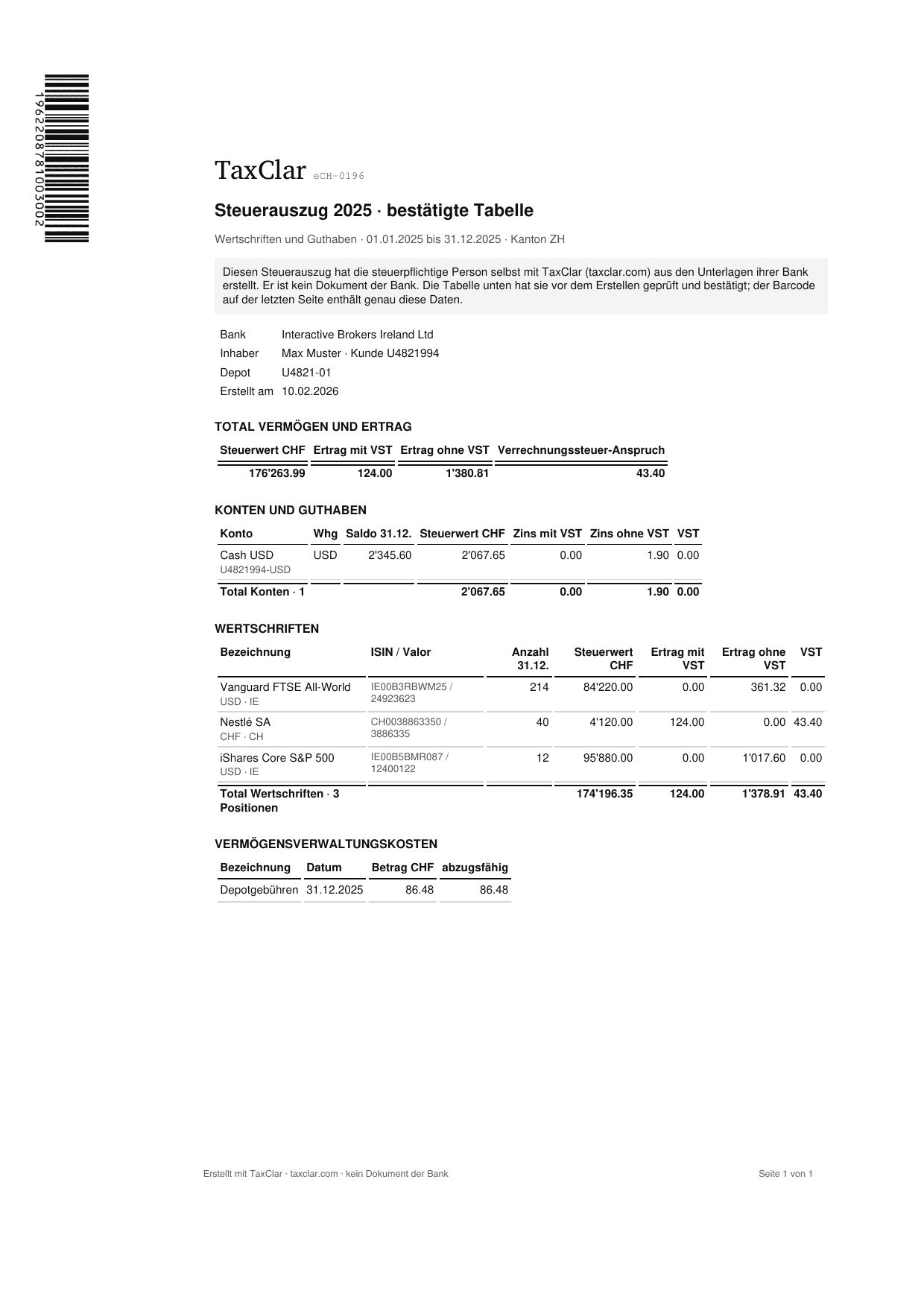
Example: an eSteuerauszug from four Interactive Brokers PDFs, 63 pages read.
What it costs
Viewing and checking is free. You pay when you generate the first PDF:
| Price per tax year | |
|---|---|
| Private, up to 40 lines and 2 holders | 14.90 CHF |
| Trader, unlimited | 49 CHF |
A line is one security, one dividend or interest payment, or one trade. Cash accounts do not count. An account with many dividend payers passes 40 lines quickly; you see the number before you pay. No subscription. If the tax office cannot read the barcode, you get your money back. All prices are on the pricing page.
What happens to your data
The files are stored at Infomaniak in Switzerland. They are read with AI models from Mistral in the EU. You delete your documents yourself, and TaxClar never asks for a login or any access to your Interactive Brokers account.
Quick questions
Does Interactive Brokers issue a Swiss tax statement? No. There is the Activity Statement and other reports, but no statement in the eCH-0196 format with a barcode.
Is the MTM Summary enough? No. It lacks the section with the ISINs. Use the Activity Statement in the "Default" template.
Do I attach the statement to the tax return? You upload the PDF with the barcode in the online tax return or enclose it with the paper return, as you would a bank's statement. What an eSteuerauszug is in detail is explained in What an eSteuerauszug is.
I have several brokers. Each broker and each tax year gives its own statement. The price is per tax year and covers every statement of that year.
Upload your Activity Statement and see the result
The statement is not tax advice. It puts existing figures into the format the tax office reads.